Querydsl Spatial
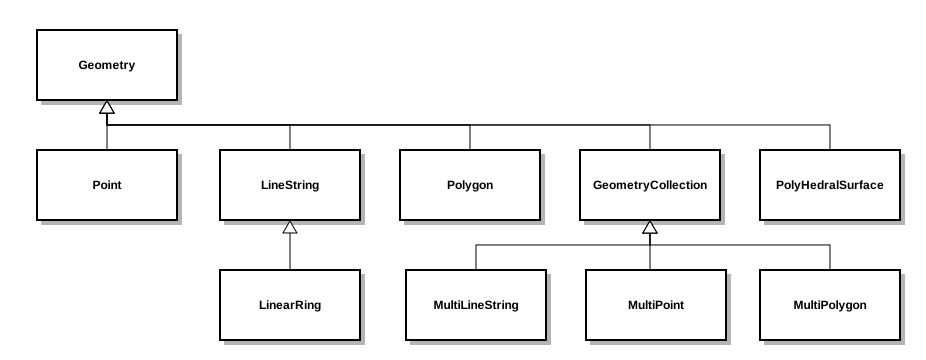
Support for spatial queries is available via the Querydsl Spatial module, which is an extension module to the SQL module. The Spatial module supports the object model of Simple Feature Access in queries and object binding.
The geolatte project is used for the object model.
Maven Integration
Add the following dependency to your Maven project:
<dependency>
  <groupId>io.github.openfeign.querydsl</groupId>
  <artifactId>querydsl-sql-spatial</artifactId>
  <version>7.1</version>
</dependency>
Additionally, add the following database-specific extra dependencies:
<!-- for PostgreSQL usage -->
<dependency>
  <groupId>org.postgis</groupId>
  <artifactId>postgis-jdbc</artifactId>
  <version>1.3.3</version>
  <scope>provided</scope>
</dependency>

<!-- for Oracle usage -->
<dependency>
  <groupId>oracle</groupId>
  <artifactId>sdoapi</artifactId>
  <version>11.2.0</version>
  <scope>provided</scope>
</dependency>
Code Generation via Maven
The code generation for Querydsl SQL can be set to detect spatial types in
database schemas and use geolatte types via the spatial property:
<plugin>
  <groupId>io.github.openfeign.querydsl</groupId>
  <artifactId>querydsl-maven-plugin</artifactId>
  <version>7.1</version>
  ...
  <configuration>
    ...
    <spatial>true</spatial>
  </configuration>
</plugin>
Runtime Configuration
Instead of the normal SQLTemplates instances, use spatial-enabled instances:
GeoDBTemplates(for H2)MySQLSpatialTemplatesOracleSpatialTemplates(alpha stage)PostGISTemplatesSQLServer2008SpatialTemplatesTeradataSpatialTemplates
Querying
With code generation and runtime configuration set for spatial types, you can construct queries with spatial operations.
Filter by Distance
Geometry point = Wkt.fromWkt("Point(2 2)");
query.where(table.geo.distance(point).lt(5.0));
In addition to straight distance between geometries, spherical and spheroidal
distance are provided via distanceSphere and distanceSpheroid.
Contains
Geometry point = Wkt.fromWkt("Point(2 2)");
query.where(table.geo.contains(point));
Intersection
Geometry geo = query.select(table.geo1.intersection(table.geo2)).fetchOne();
Access to the SPATIAL_REF_SYS Table
Unified access to the SPATIAL_REF_SYS standard table is provided via the
QSpatialRefSys and SpatialRefSys classes. SPATIAL_REF_SYS contains data
about the supported spatial reference systems.
QSpatialRefSys spatialRefSys = QSpatialRefSys.spatialRefSys;
List<SpatialRefSys> referenceSystems = query.select(spatialRefSys).from(spatialRefSys).fetch();
Inheritance
If you use only generic geometry types in your database schema, you can use conversion methods in the object model to convert to more specific types:
GeometryPath<Geometry> geometry = shapes.geometry;
PointPath<Point> point = geometry.asPoint();
NumberExpression<Double> pointX = point.x(); // x() is not available on GeometryExpression/GeometryPath